At a glance
- Typical fee
- SASSA states its services are free. Bank account/statement/transaction fees, data and travel costs are separate; confirm bank charges directly. No paid verification bypass or fast-track update is offered in this guide.
- Processing time
- No universal banking-update turnaround verified. SRD payment follows the required verification and payment processing; the official statement refers to the next pay run after verification. Confirm the current cutoff and cycle for an ordinary grant. The 2019 cutoff example is historical, not a current universal promise.
- Difficulty
- Moderate
- Authority
- South African Social Security Agency (SASSA)
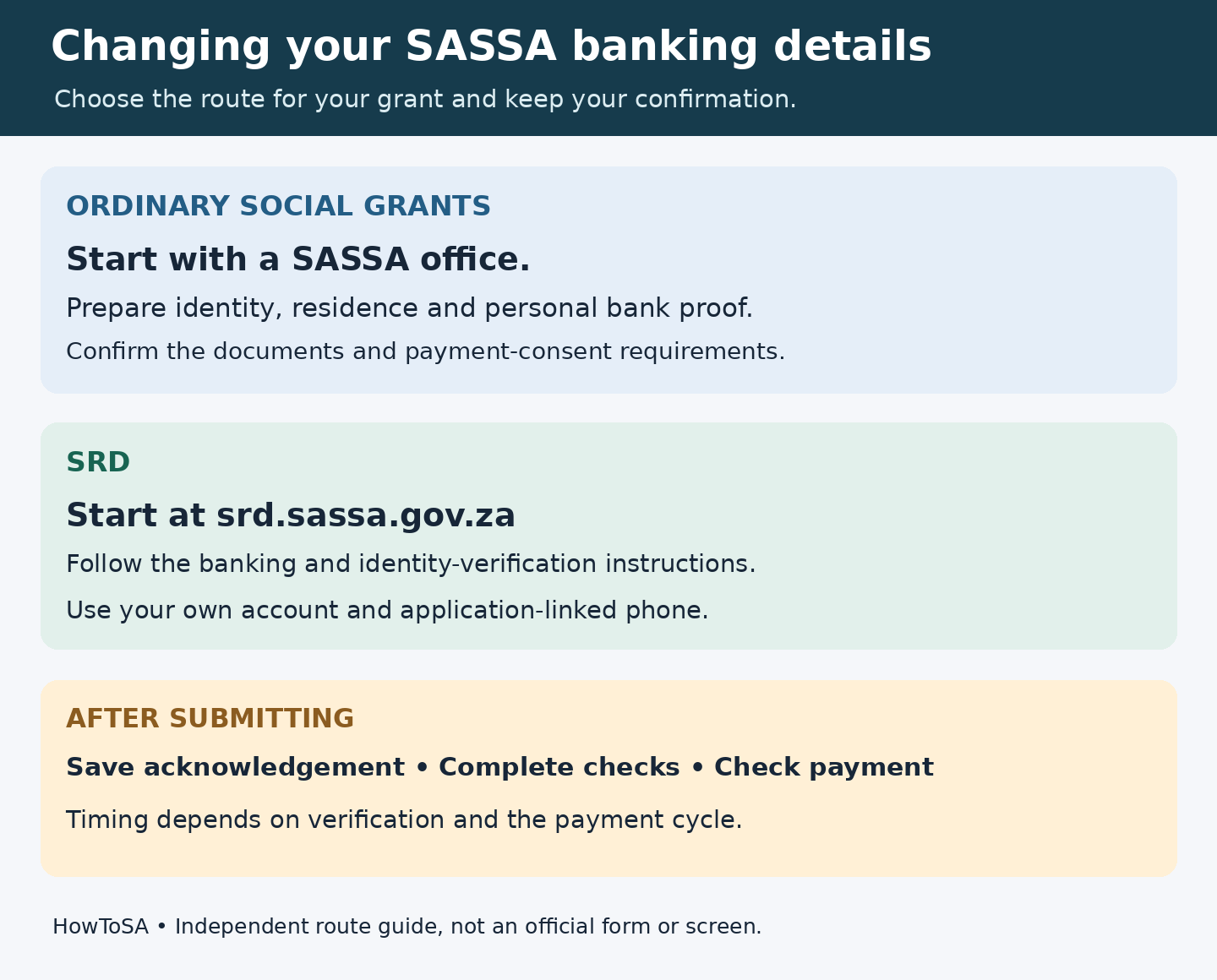
To change your SASSA banking details for an ordinary social grant, take your identification and bank proof to a SASSA office and ask to update your payment account. For SRD, start at the official SRD website and follow the banking-details and verification instructions for your application. Use an active account in your own name.
Keep evidence of the request and check when the verified account will be used. Submitting new details does not mean the next payment has already been redirected.
Checked: 30 October 2026. This guide covers updating an existing record. SASSA may request additional verification for your circumstances; changing a bank account does not establish grant eligibility.
Which SASSA banking details route applies?
Ordinary social grants: Examples include the Older Person’s, Disability and Child Support grants. SASSA’s published payment-option guidance directs beneficiaries to an office with identity, residence and bank evidence. Check your nearest office’s current arrangements before travelling. Our SASSA office guide explains how to locate and confirm a service point.
SRD: Use the separate official SRD channel. SASSA’s November 2025 verification statement directs applicants to select the appropriate South African ID or asylum-seeker/special-permit category and follow the prompts. If your category or record does not offer a banking-change option, ask SASSA for assistance.
If you are helping a beneficiary who cannot attend because of illness or disability, ask SASSA about its authorised representative arrangements. Family assistance should not involve substituting the helper’s account or sharing a bank PIN.
Documents and information to prepare
For an office visit, prepare:
- Your identity document, or ask SASSA which approved alternative identification it will accept.
- A recent three-month bank statement showing your name and account number. The 2026 SASSA grant booklet specifies this when banking details are updated and says the personal account must be active and accept Electronic Fund Transfers (EFTs).
- Proof of residence, as identified in the office payment-option guidance.
- Your grant reference or existing correspondence, current contact number and any request for additional documents.
If the account is newly opened and you cannot produce three months of statements, obtain a bank confirmation letter and ask the office what it will accept before travelling. Do not assume that an older checklist mentioning a letter overrides the current booklet’s statement requirement.
For the SRD route, have your application-linked phone, identification details and accurate bank information ready. Provide documents only through the official process when requested. The office checklist is not a direction to upload statements to an unrelated website.
1. Check the account and the existing grant record
Confirm that the account is open, belongs to the person on the grant payment record and can receive EFT payments. Read the account number and account type from bank-issued information. Ask the bank to clarify anything unclear, including a branch code if the update process requests one.
Distinguish changing the payment account from replacing a card, correcting a name or checking an application result. If your identity details differ between the bank and grant record, use our SASSA name-correction documents guide and ask which record needs correction.
2. Prepare your proof and confirm where to submit it
Use the official SASSA service-office directory to confirm the relevant office and contact arrangements. Explain that you want to update banking details for an existing grant. Ask whether you need a payment-consent form, additional bank confirmation or representative documentation.
Obtain any required form from SASSA through its confirmed channel. Do not rely on a blank form circulated in a social-media group being the right current version for every grant.
Take originals for inspection and keep copies of what you submit. Preparing the folder in advance helps you identify exactly what an official says is missing.
3. Submit the change through the correct channel
At an office: Give the official the requested identification and bank proof. Complete the payment instructions or consent requested for your record. Check the captured bank name, account number and account type before confirming the request. Ask for acknowledgement and the expected payment cycle affected.
For SRD: Navigate to the official SRD address yourself. Choose your applicant category, access the banking-details function offered for your record and follow its identity and phone-verification prompts. Enter the account information exactly as supplied by your bank. If you request a verification link, check the destination before entering personal information.
Screen layouts can change. During this guide’s check, the public SRD pages returned temporary service errors, so a current signed-in screen sequence could not be confirmed. If the portal is unavailable, retry the official service later or contact SASSA; a third-party form cannot repair its availability.
4. Complete the verification SASSA requests
SASSA’s November 2025 statement says banking information belonging to someone else will not verify for SRD payment. It also stresses using a cellphone number registered in the applicant’s name so verification notices reach the right person.
The current official SRD leaflet describes facial verification for changing a cellphone number and for certain referred or approved-but-unpaid cases. If your registered number is lost or inaccessible, resolve the contact/identity issue through SASSA’s instructions. Do not assume that entering a different number on an unrelated form updates the application.
Complete any genuine request for further verification through the official channel. Avoid repeatedly changing an otherwise correct account while checks are pending: SASSA’s January 2025 warning says repeated changes to banking and contact details can delay payment.
5. Keep confirmation and check the payment outcome
Save the submission date, office or portal used, reference and any confirmation. For your own records, note which account was supplied and retain the bank proof securely.
Ask whether SASSA has received the change, whether the account is verified, and which payment run should use it. These questions help separate an unprocessed request from a payment already sent elsewhere.
Check the actual bank transaction and the official grant status. Our SASSA status-check guide explains the different ordinary-grant and SRD routes. An update confirmation alone does not establish that a deposit has arrived.
6. Query an unresolved change through official support
Start with the office handling the request or call 0800 60 10 11. SASSA’s current head-office and regional directory publishes GrantEnquiries@sassa.gov.za and regional contacts. Its services-portal contact page also provides provincial grant-enquiry channels.
Explain the grant type, request date, reference and exact problem. Ask whether information is missing, which account is verified and what action is needed. Request an enquiry reference and keep a chronology. If unresolved, ask the office’s supervisor or the relevant regional customer-care channel to review the handling.
SASSA publishes a Grant Customer Support Request form with enquiry, complaint and dispute categories. If asked to use it, follow its typed-entry instructions. It records a support request; it is not itself proof of a completed bank-account change.
What does it cost, and how long will it take?
SASSA service fee: SASSA states that its services are free in its official anti-misinformation notice. Do not pay someone claiming they can bypass verification or release a grant. Bank account, statement, transaction, data or travel costs are separate; confirm any bank charges with the bank.
Timing: The checked sources do not establish a universal banking-update turnaround. SASSA’s SRD statement says payment follows verification in the next pay run; this is conditional on the required checks and payment processing, not a guaranteed date from submission.
The 2019 payment-option notice contains an example cutoff. Treat it as historical wording and ask the office which cutoff and cycle apply now. Do not rely on a blanket “15th of every month”, “24 hours” or “seven days” promise for every grant.
Common problems and fixes
- The account belongs to a relative. Use your own qualifying account, or ask SASSA about an approved representative arrangement.
- The account number was mistyped or the account closed. Obtain correct bank proof and ask SASSA how to correct the existing record.
- No verification message arrives. Check the application-linked phone and the official contact-change instructions.
- The bank and grant names differ. Resolve the identity mismatch with the responsible institution and keep correction evidence.
- The old account received the payment. Ask which payment run had already been processed and when the verified change becomes effective.
- The status is declined or referred. Read the reason and ask about the appropriate remedy. A bank edit alone may not address it.
Protect your information while making the change
Never share your bank PIN, internet-banking password or card security code with a helper. Enter any legitimate verification code only in the official process you initiated; do not disclose it to an unsolicited caller. Keep identity and bank documents out of public comments.
If someone changed your details without permission, contact SASSA promptly and alert your bank where account access may be compromised. The grant booklet lists 0800 701 701 for fraud reports. Keep suspicious messages and any reference numbers.
Official sources checked
Checked on 30 October 2026. Historical notices are identified by their publication dates; current requirements and the instructions for your record take priority.
- You and Your Grant — SASSA 2026 booklet hosted by DSD
- SASSA payment-option notice — 11 October 2019
- SASSA SRD verification statement — 6 November 2025
- SASSA service-office directory
- COVID-19 SRD leaflet — currently published by SASSA
- SASSA warning about repeated banking/contact changes — 20 January 2025
- SASSA head-office and regional contact directory
- SASSA Online Services contact page
- Grant Customer Support Request — SASSA form GA-5050-001
- SASSA anti-misinformation statement — 29 August 2024
Independent-site note: HowToSA is an independent information website. We cannot change SASSA records, receive banking details, verify identity or guarantee a payment.
Accuracy note: Checked 30 October 2026. Used the current SASSA booklet and SRD leaflet, separated ordinary-grant documents from SRD digital instructions, qualified historical cutoff wording and recorded SRD public-page 503 errors. No current signed-in screen sequence, fixed completion deadline or guaranteed payment date is invented. Editorial review 14 November 2026: SASSA ordinary-grant and SRD bank-change routes checked against published 2026 guidance; no fixed bank verification turnaround confirmed. Some account-specific forms or live portal screens are not publicly accessible; readers should check the current official channel before submitting.